
In today’s hybrid work environment, organizations juggle scattered documents, overflowing inboxes, and a constant stream of communication. Without the right tools, teams lose time searching for files, tracking versions, or trying to connect conversations to documents. Microsoft SharePoint offers a centralized solution a digital workplace where content, collaboration, and compliance align under one digital roof.
Whether you’re scaling operations or improving team coordination, understanding SharePoint fundamentals helps leaders drive efficiency and informed decision-making across teams.
1. What Is SharePoint and Why It Matters
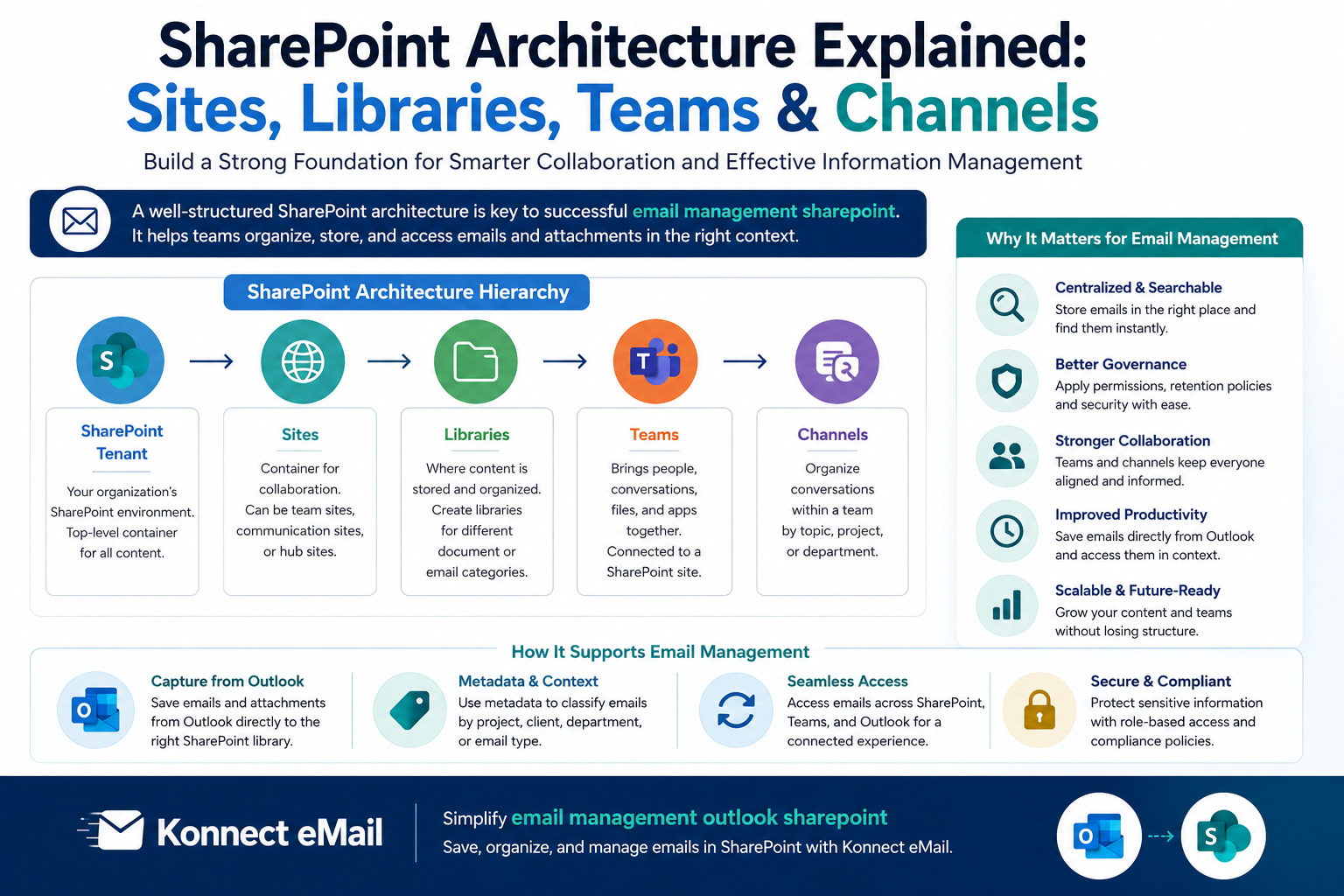
At its essence, SharePoint is a web-based platform from Microsoft that helps organizations store, share, organize, and manage content and information within a secure framework. Integrated deeply with Microsoft 365, SharePoint acts as more than a file repository — it becomes a hub for documents, intranets, team sites, and knowledge libraries.
Business leaders benefit from:
Intranets and portals for company updates
Team sites for collaborative workspaces
Document libraries with structured access and versioning
Searchable repositories that keep institutional knowledge accessible
3. Three Core Pillars: Collaboration, Compliance, and Control
Collaboration
SharePoint brings people and content together in one place. By working with tools like Microsoft Teams, OneDrive, and Outlook, employees can co-author documents in real time and find everything they need without switching apps or managing multiple versions of files.
One everyday way teams boost productivity is through managing communications as content. For example:
You can drag and drop from SharePoint to Outlook to include files or existing documents in an email message (and vice-versa, with the right tools).
Tools such as Konnect eMail elevate this experience by giving users intuitive features like saving emails and attachments from Outlook into SharePoint libraries while capturing metadata for compliance and governance.
Compliance
As teams generate more content, securing and governing that information is vital, especially in regulated industries. SharePoint supports:
Granular permissions on files and libraries
Version history for restoring previous iterations
Audit trails for visibility into who did what and when
Integration with Microsoft compliance tools for retention and sensitivity policies
This framework helps organizations meet legal and industry requirements without slowing down business processes.
Control & Governance
Leaders gain visibility and governance over organizational content through:
A centralized admin dashboard to manage sites and permissions
Metadata and information architecture for easy content discovery
Automated workflows with Power Automate to route reviews and approvals
With these tools in place, content becomes easier to manage — and harder to lose in the chaos of uninformed file sharing.
4. Transforming Email into Structured Content
One of the most overlooked efficiencies in business communication is the link between email and content repositories. For many teams, critical decisions, client correspondence, and project attachments live only in individual inboxes invisible to others and untethered from structured knowledge bases.
SharePoint can change that by enabling:
Centralized email storage accessible to authorized users
Searchable correspondence tied to relevant projects or clients
Automated retention tracking for archived communications
A powerful practice some users adopt is to drag and drop from SharePoint to Outlook bringing files into an email or attaching SharePoint content directly from the document library.
Additionally, Konnect eMail enhances this workflow by allowing you to drag emails and attachments from Outlook into SharePoint, Teams, or OneDrive with ease. The add-in captures metadata automatically and simplifies classification and retrieval later without extra steps.
5. Real-World Scenarios Where SharePoint Excels
Scenario 1: Launching a Cross-Functional Project
A product team uses a SharePoint site to store specs, marketing content, and launch plans all in one location. Contributors across departments work in tandem on Word, Excel, and PowerPoint documents, and everyone sees the latest version in real time.
Outcome: Reduced duplication, clear version control, and faster progress to market.
Scenario 2: Creating a Compliance Knowledge Hub
A regulated business centralizes policies and procedures in a SharePoint intranet. Each document is tagged and categorized, while strict access permissions ensure only the right people can edit or view content.
Outcome: Enhanced audit preparedness and reduced compliance risk.
6. SharePoint vs. Alternatives
When compared with other platforms like Google Workspace or generic cloud storage:
SharePoint stands out for deep Microsoft 365 integration, governance features, and custom metadata support.
Google tools offer simplicity for basic file sharing but lack the same enterprise governance depth.
Content platforms like Box are strong on security but don’t tie as seamlessly to Microsoft collaboration tools.
Choosing the right solution depends on your organization’s existing ecosystem and compliance needs.
7. Key Takeaways for Business Leaders
SharePoint isn’t just a storage system it’s a strategic tool for digital collaboration. When implemented with clear governance and user-centric processes:
Teams waste less time searching for information
Communication and documentation become linked and discoverable
Leaders gain better control over organizational knowledge
And with tools like Konnect eMail, even everyday tasks like managing emails and attachments become part of a structured, compliant digital workflow not siloed distractions.





Write a comment ...